|
Class Summary March 11th
I. Summarize
A. SAS Temp vs. Perm
B. Functions
1. INDEX
2. SUBSTR
3. COMPRESS
C. Unix Command CAT
D. Titles as organizers
E. ARRAY statements
F. Homework
II. Questions
A. Max
B. z-Score
C. New variables
1. Must be in data step
2. PROC _______
3. Get back in data
4. Start new data step
5. Build data before PROC statement
6. Builds as you execute function
7. Goes through function sequentially
8. Be careful as new variables must be referenced
above
D. Computer rounding rules are a function of precision, which depends
on the architecture of its binary operations.
III. Midterm
Bring notes, books, example programs . . .
IV. Review
A. SET
1. Calls data and appends or in other words adds new data.
B. MERGE
1. Merges two data sets, but second set will overwrite first.
C. UPDATE
1. Updates data set with another set and does not overwrite missing
values of first data set.
D. VAR
1. Want only certain variables to print out on report, for instance
i1-i50.
ex. PROC PRINT;
Don't want i34
ex. PROC PRINT;
Another example:
Data One; INFILE 'xxxx';
PROC PRINT;
Double dash will do everything based on ordering in INPUT statement.
E. Important Question
If DIS GE 16 then
else if (DIS+DE+AV) GE 34 then
This represents a case where ELSE doesn't matter.
Not clear of rule. Make up a number and go through the procedure
(test).
V. Project
A. Change z-Scores
to t-Scores
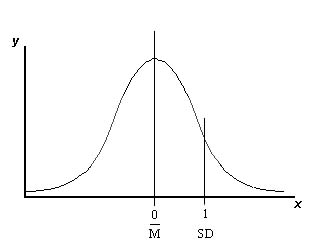
Could add 50; z-Score centered on 0; multiply numbers; SD=1 multiply
by 10 so SD=10.
z-Score*10 widens distribution; then want mean to equal 50
t-Score = 50+(z-Score*10);
shifts up 50 points
20 to 70
10 to 60
0 to 50.
Can nest many functions, for example
TD = 50 + ( (D-16) /4.3)*10;
B. Discussion of validating rules for ORAS
1. Mahalanova (sp?) Distance
a. 2 dimensional
b. how far each observations is from mean; plot distance
2. Cluster Analysis
a. Based on empirical location.
b. Used CART (Classification and Regression Technique)
to make sure cluster was meaningful
C. In-class assignment
1. Access log.file
2. Input data
3. Read time as string
4. Get hours out (substring)
5. PROC FREQ for table of hours
6. Solution Examples
data hour;
infile 'access.log';
input junk1 $ junk2 $ junk3 $ stuff $15.;
hour=substr (stuff,14,2);
* above reads only the hour information;
proc freq;
tables hour;
run;

data showhour ;
infile 'access.log';
input rec $ 1-80;
pos = index(rec,':')+1;
hour = substr(rec, pos, 2);
proc print data=showhour;
title ' Yang Yu Class Show Hour Using Substr Function ';
run;
data hours;
*use substring function to get the hour listed on each line;
*We could use free field input;
infile 'access.log';
input stuff1-stuff4 $15.;
hour=substr(stuff4,14,2);
run;
proc freq;
table hour;
proc print;
run;
data compacc;
infile 'access.log';
input ip$ d1$ d2$ date $25. ;
hour = substr (date,14,2);
proc freq;
tables hour;
proc print;
run;
|